|

Comments
Orthodox Blasphemy
Returning It
|

Steve Jobs Memorial Apple Logo |

Logo of X-rated 1970's Film Emanuelle |
|
|
|
|
Gift Certificate
|
|
|
|
 It's very difficult to obtain a
refund for an iPhone App!
It's very difficult to obtain a
refund for an iPhone App!
I logged on to my Apple account but I couldn't figure out how get the
refund. The App didn't do what I thought it said that it would do.
I tried and tried. I had deleted the App.
In desperation I visited the Apple
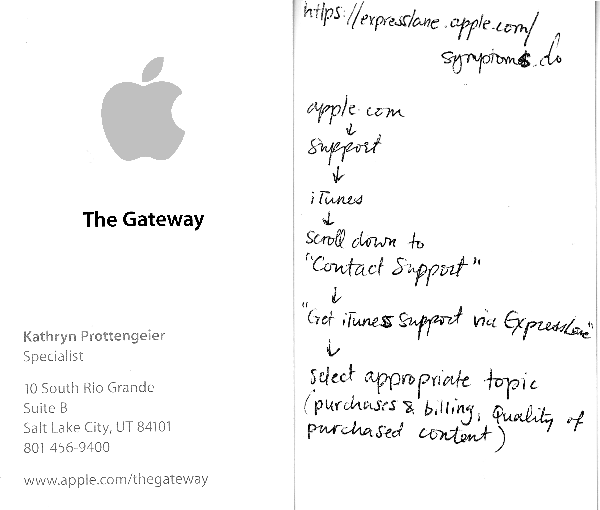
store. The friendly clerk, Kathryn Pottengeier tried to help, but
together we couldn't accomplish this either! So, she wrote
instructions about how to do that on the back of her business card. To
tell the truth, I never tried it again. It's just too complex!
I called my credit card company and
disputed the charge. That company gave me my refund. It was for
$1.07.
|
|
|
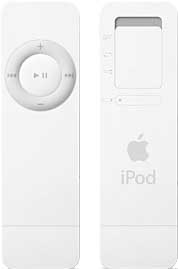
iPod, iTunes, iHate it
I
can't download songs. |
|
|
This is what happened
I bought an iPod...
Ten Easy Steps...
|
|
|
(1)
Your existing Apple account that was used to buy your iPod is supposed
to work with purchasing songs from iTunes. To use your Apple account
you have an “Apple ID” and a “Password.” The Apple ID is your email
address.
(2)
When buying songs on iTunes watch it reject your account over and over
again because it will not recognize your Apple ID.
(3)
Call Apple and tell them that iTunes rejects your account because it
says “Your Apple ID is wrong.” They will tell you to create a new
account.
(4)
Take Apple’s advise, log onto the Apple web-site and try to create a
new account. Watch the web-site prevent you from doing so because it
says “You already have an existing account.”
(5)
Call Apple again for help. Apple will refer you to the website
apple.com/support/itunes/windows/downloads.html
and they will tell you to solve the problem yourself. And if you can’t
solve this problem Apple will tell you to use the email query at
the bottom of the web-site to ask for help.
(6)
When trying to use the email query to ask a question, it has required
information that must be entered before it will let you ask your
question via email. It requires an “iTunes Account Name.” When you’re
locked out of iTunes it’s impossible to get an “iTunes Account Name”
to begin with.
(7)
Call the Apple returns department to return your iPod since iTunes is
the only place from which iPods can download music and you obviously
cannot access iTunes. The person in the returns department will want to see if they can log into iTunes themselves using your AppleID and
Password. Do not give them your Password. The person in the Apple
returns department will tell you that you will not get back 10% of your
refund because you opened the iPod packaging. The instruction manual
that came with the iPod tells you to charge the built-in rechargeable
battery in the iPod before accessing iTunes. That requires opening the
packaging.
(8)
Then the person in the returns department will direct you to an iTunes
Support web-site which you will see has the same email query and
required information as the previous web-site you were directed to. To
by-pass the “iTunes Account Name” obstacle, they will tell you to enter
in only half of your Apple ID. They said this is a short-cut that they
know but not the customers with the account.
(9)
Then the person in the returns department will have you enter false
information about your account. They told me to check “AOL” instead of
“Apple ID” as an “Account Type” which is false. This is another
short-cut they knew of that the customer with the account does not
know. Then you can finally send your question via email. This web-site
is not customer friendly since you will not know any of the
“short-cuts.” This web-site promises an answer to your question within
48)hours.
(10)
Now in your 49th hour and beyond... you will get no response from
Apple. Have a great time with your new iPod!
|
|
|
Russian Church
Brings Apple’s
‘Blasphemous’ Logo Under Fire
The apple may be a symbol of original sin --
but blasphemy? Some Orthodox Christians in Russia are are odds
about what they say is Apple’s blasphemous logo.
Some Orthodox Russian believers see the Apple's logo of the bitten apple as
a symbol of Adam and Eve’s original sin in the Bible. Some have gone so far
as to cover up the logo and replace it with an image of a cross.
The backlash could be connected to the church’s sensitivity over what they
see as threats to the influence of the church. After punk rock band “Pussy
Riot” staged a controversial protest inside one of Russia’s main cathedrals,
the church pushed for the jailing of the band’s leaders. Now, they may be
looking to clamp down on anything else they perceive as a sign of
disrespect.
New anti-blasphemy laws are being proposed in Russia’s parliament that could
actually bar Apple from selling products carrying its own logo in the
country. So far, Apple has had no comment on the story.
Apple could have some allies in Russia. Russian political party Yabloko has
been a big critic of the efforts to create what it is calling a
“clerical-police state” that it says is “deliberately fueling a conflict
between the Russian Orthodox Church and secular civil society.”
Yabloko is a natural ally for the Cupertino firm for another reason too —
the party’s name is also the Russian word for “apple.”
|
|
|
Links:
Sony Service
Run Mac OS X on PCs!
Apple.com
|